

This article explains how license migration works when moving Zyxel licenses from USG FLEX and ATP Series devices (ZLD / MyZyxel) to USG FLEX H Series devices (uOS / Nebula). It focuses on which standard ZLD-based licenses can be migrated, which cannot. The guide is intended for network administrators and integrators who are planning to replace legacy ZLD firewalls with H-Series devices and want to understand the official migration rules, limitations, and account/device requirements.
In addition to standard ZLD licenses, the article also covers the special case of Nebula Plus/Pro Pack. Only for these subscriptions we explain how ZLD’s individual-key model differs from the H-Series One-Pack model, how remaining days are preserved during migration, and what happens to the license keys on both devices. Unlike standard ZLD licenses, Nebula Plus/Pro Pack supports bidirectional transfer, which is described separately in a dedicated section and linked migration guide.
Standard ZLD licenses (USG FLEX and ATP Series) can be moved only in one direction:
USG FLEX / ATP → USG FLEX H Series (A migration from USG FLEX or ATP to the USG FLEX H Series is technically possible, but only in specific scenarios and under certain conditions. For example, eligibility may apply if you participate in Zyxel’s Upgrade Your Network Security with Zyxel’s Trade-Up Program.)
Moving licenses in the opposite direction is not possible and is not supported by the Zyxel architecture.
USG FLEX H → USG FLEX / ATP
The Nebula Plus/Pro Pack is an exception.
These subscriptions have their own transfer rules and can move in both directions, but their process is not part of the ZLD licensing system and is explained separately.
For more details, see the section below:
➡️ Nebula Plus/Pro Pack transfer guide between Zyxel USG FLEX / ATP Series and USG FLEX H-Series
General Principles
Transfer behavior
Once a migration is performed, the license becomes active on the new device and no longer functions on the originating unit.Account alignment
Successful migration requires that both devices are managed under the same user account environment.Model pairing
License movement typically applies only between devices from corresponding generations and performance segments.
License Eligibility
Some licenses align naturally with the migration framework, while others operate under separate mechanisms and therefore do not take part in the process.
Generally Supported for Migration: UTM Security Pack, Gold Security Pack, 2-in-1 Pack, SecuReporter, Secure WiFi, Nebula Plus / Nebula Pro (operates under its own transfer workflow);
Not Included in the Migration Path: Hospitality Pack, NBDD, Package Update, Firmware Upgrade, HA Pro, Trial Licenses.
Additional Notes
After migration, the originating device will no longer retain active license rights.
Device ownership must be unified under the same account before initiating any transfer.
Nebula Plus/Pro Pack transfer guide between Zyxel USG FLEX / ATP Series and USG FLEX H-Series
- How Zyxel stores licenses
| Non-H (USG FLEX, ATP and others) | H-Series (USG FLEX H) |
|
|
|
Transfer of a Non-H license → H-Series — what happens
If a Non-H device has an active or queued license (for example, a Pro/Plus Pack), it can be moved to an H-Series device.
During the transfer, all separate license keys are combined into one package (One Pack).
The remaining days are kept as a single value.
Conclusion: When you migrate to an H-Series device, you get a clean transfer with no loss. This is the safest way when upgrading.
License Transfer H-Series → Non-H — what happens
The H-Series stores the license as one unified package, not as separate keys. When transferring back to a Non-H device, this package is split into individual licenses.
The system tries to allocate the longest possible Non-H key first — a 4-year key (1461 days). Then, it splits the remaining days into monthly licenses.
If after that there is a partial month left (e.g., 22 days), the system does not create a partial key. Instead, it generates a full 1-month license key.
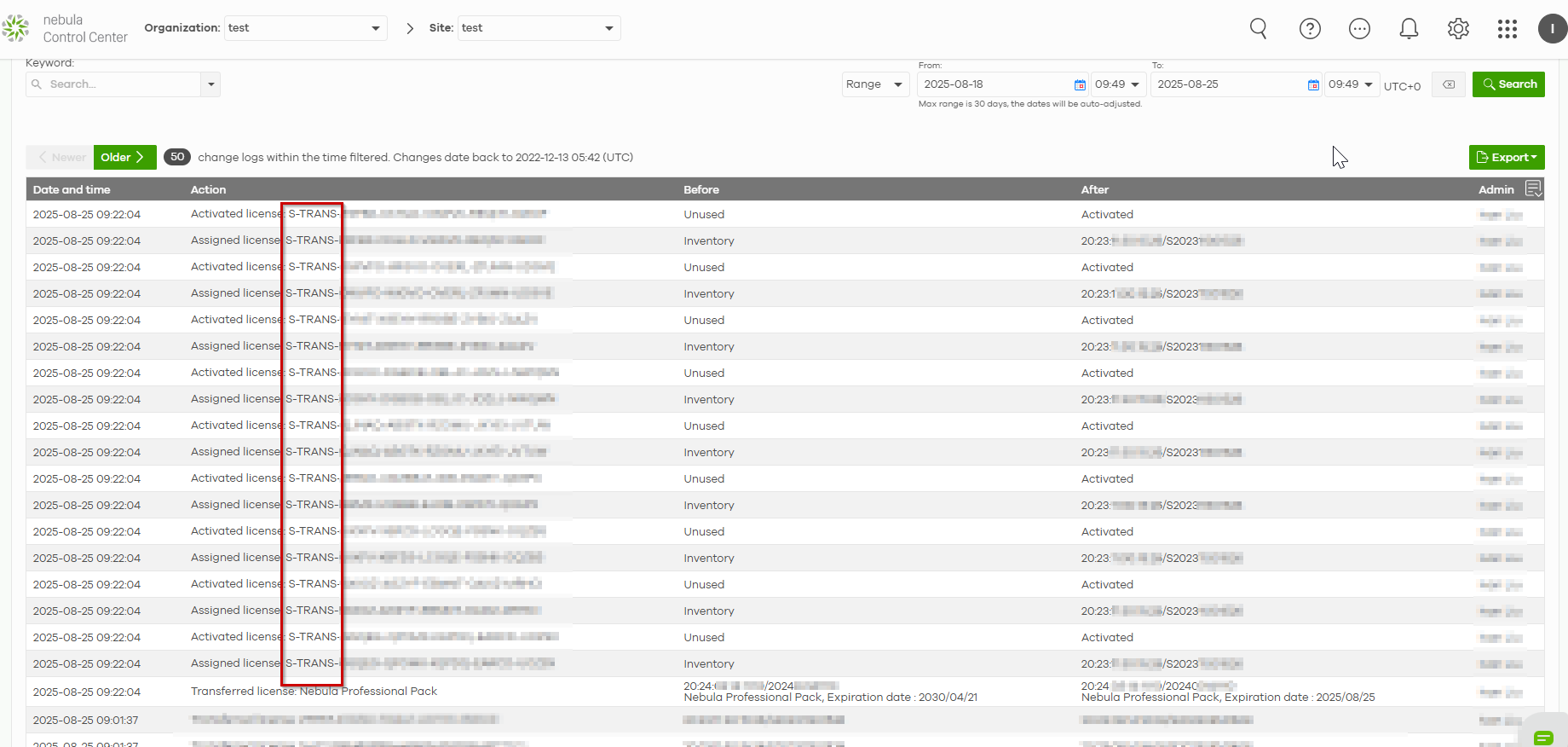
All keys created during the transfer use the prefix “S-TRANS-”, indicating they were “translated” from an H-Series package.
What You End Up With
One long-term key + several monthly ones.
A potential loss of remaining days — the leftover from the split may not be preserved.
For example:
If the leftover is 22 days, the system rounds it up to a full 1-month license.
But if the leftover is 14 days, and the system detects that rounding up would require adding more days than the leftover actually contains, it will instead round down, effectively not creating an additional monthly license — and those remaining days are lost.
New S-TRANS keys replacing the original ones.
In the Change Log, an entry showing a “Transfer license” event with both the source device and the target device.
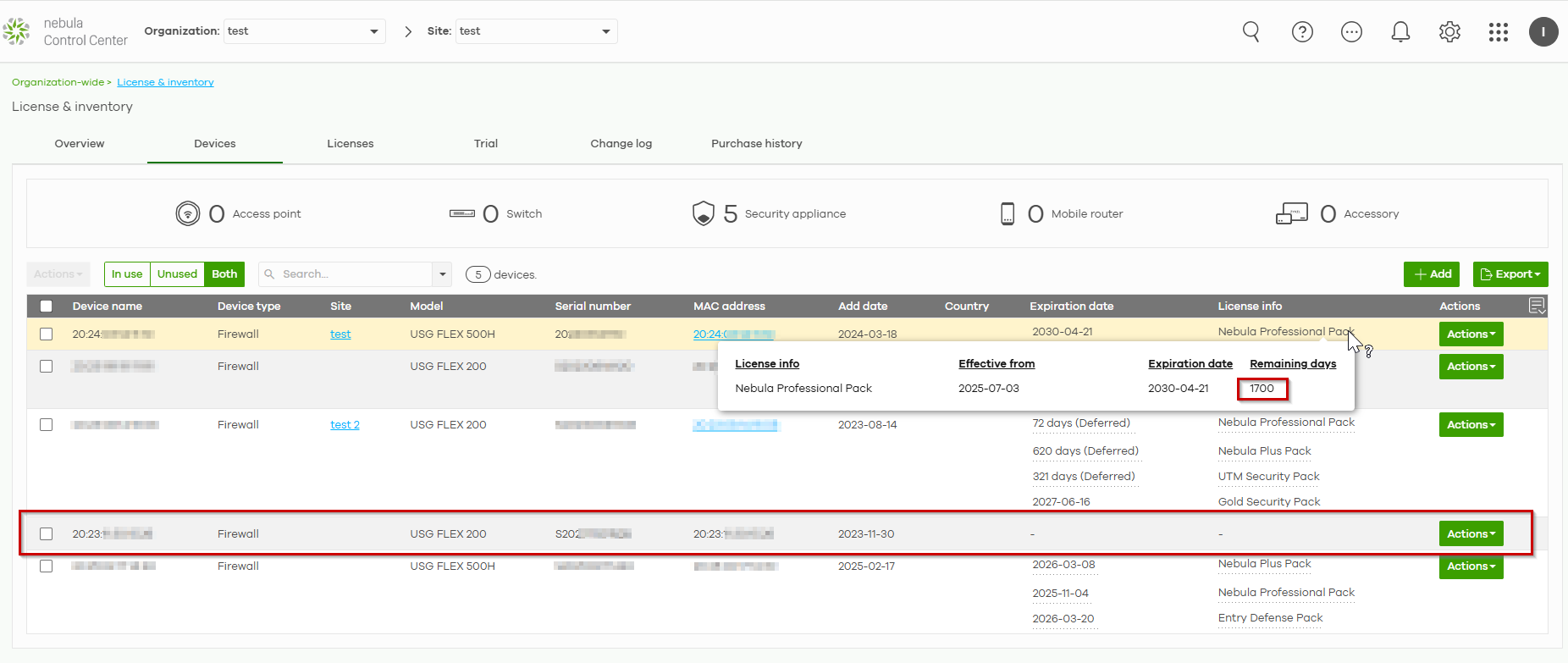
Below is a clear, step-by-step example showing how Zyxel converts licenses during an H-Series → Non-H-Series transfer. On the USG FLEX H device, the One-Pack license appears as a single large bundle — in this example, 1700 days remaining.
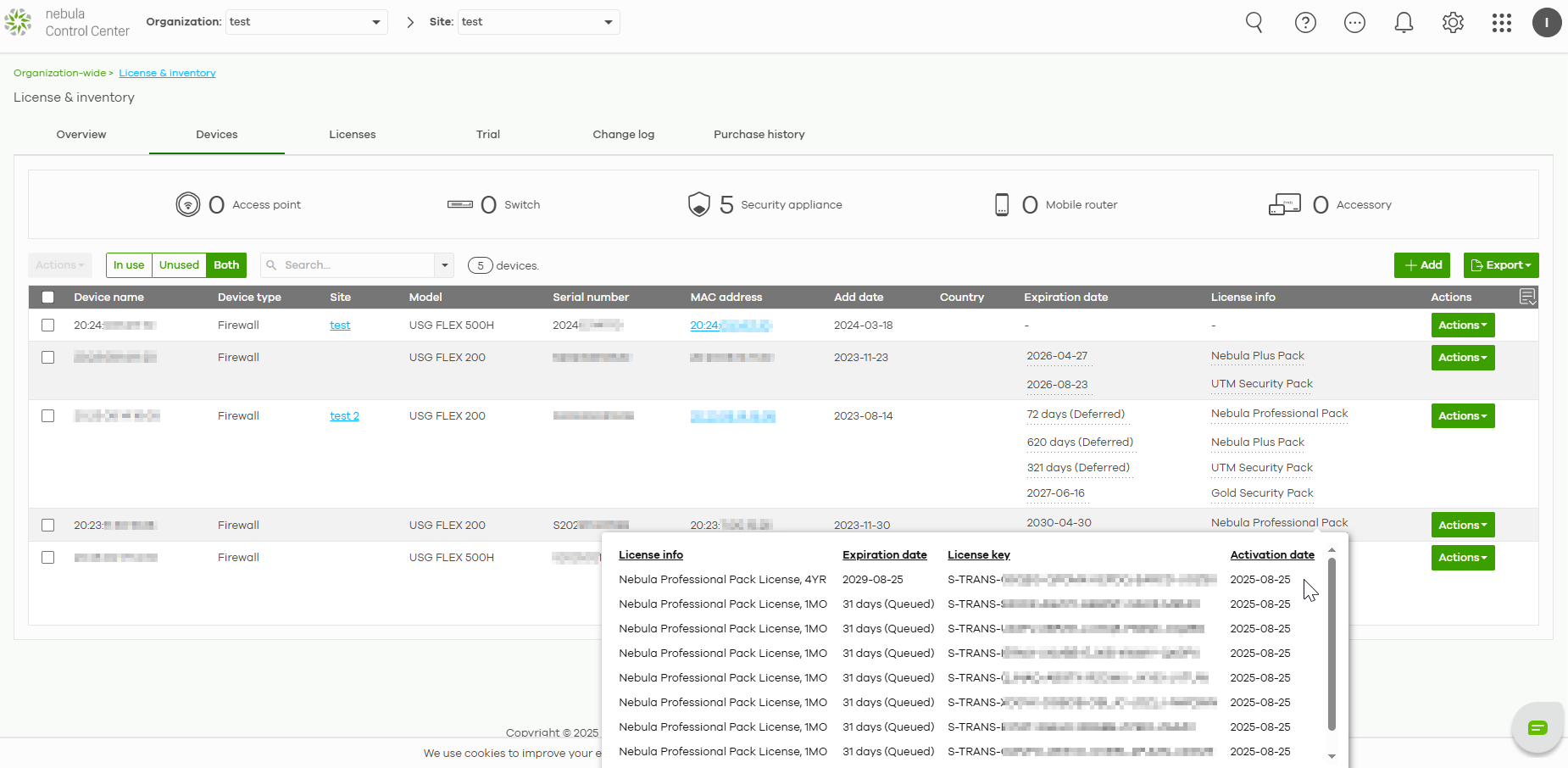
After the transfer, the system breaks the One-Pack into license periods supported by ZLD:
Creates one 4-year key (1461 days)
Generates multiple monthly keys, each 31 days
All generated keys include the S-TRANS prefix, indicating they were created during the conversion
After the transfer is complete, you can check the Change Log. You'll find the transfer record here and notice the new license keys begin with S-TRANS.
Comments
0 commentsPlease sign in to leave a comment.