

Nebula provides each managed firewall with an automatically assigned domain name that can be used for Remote Access VPN connections. This simplifies VPN configuration and helps ensure consistent access, even when the WAN IP address changes. This article explains how the Nebula-assigned domain name works and how to configure the appropriate binding address.
What Is a Nebula-Assigned Domain Name?
Each Nebula-managed firewall is automatically assigned a unique domain name (for example, abc123.zyxelcloud.net) by the Nebula Control Center (NCC). This domain name is:
Bound to the firewall’s IP address
Used for Remote Access VPN services such as IPSec VPN and SSL VPN
Where to Configure It
This setting is available only in Nebula and cannot be modified using the local firewall GUI. To locate the setting:
Go to Site-wide > Configure > Firewall > Remote access VPN
You will see an option to choose or change the binding address, which determines the interface or IP that the domain name resolves to.
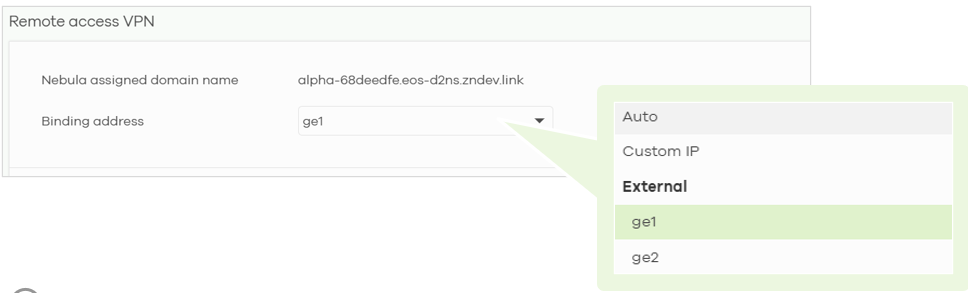
Binding Address Options
The Binding Address controls which IP address the Nebula-assigned domain name resolves to. The available options are:
Auto (Default)
The domain name resolves to the IP address used for Nebula connectivity. Ideal for typical single-Internet setups.Specific Interface (e.g., Ge1, Ge2)
Binds the domain name to the selected WAN interface IP, useful when multiple WAN connections exist.Custom IP Address
Manually specify a public IP address, suitable for static IP or multi-WAN scenarios.
Example:
When a DNS lookup (e.g., via nslookup) is performed for the assigned domain:
Auto: returns the IP used for Nebula connectivity
Interface: returns the selected interface’s IP (may be private if NAT is involved)
Custom: returns the manually specified public IP
This gives you full control over which address is published in DNS for VPN clients.
Certificate Binding for VPN
After the firewall is successfully onboarded with NCC, NebulaRemoteAccessDefaultCert is uploaded to the firewall. This certificate is used for automatic certificate validation when the VPN Server Address uses the Nebula-assigned domain name. You can also manually configure the certificate if needed.

Comments
0 commentsPlease sign in to leave a comment.